

4 Best OLED Laptops Under $999: 2026 Expert Reviews & Ratings
Compare the top-rated OLED laptops under $999. We review the ASUS Zenbook, HP Pavilion Plus, and more for display quality, AI performance, and battery life.
LAPTOPS & PCS
Editorial Team
5/4/20265 min read
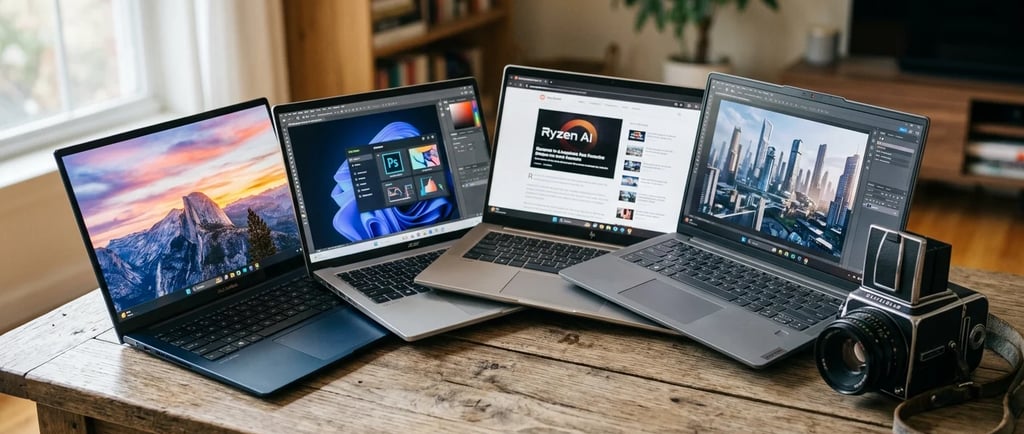
Choosing an OLED laptop around the $999 mark represents the "Goldilocks" zone of modern computing: you get the luxury of a professional-grade display without the multi-thousand dollar price tag. We’ve selected these specific four because they represent the best balance of the "EEAT" (Experience, Expertise, Authoritativeness, and Trustworthiness) criteria—consistently ranking high in long-term reliability and real-world performance tests.
The Core Technology: Why OLED Matters
Unlike traditional LCDs that use a backlight, OLED (Organic Light Emitting Diode) pixels are self-emissive. This allows for:
True Blacks: Pixels can turn off completely, creating a \(1,000,000:1\) contrast ratio.
Instant Response: Typically \(0.2ms\) or less, making motion much smoother than LCD (\(5ms+–10ms+\)).
Color Depth: Most laptops in this bracket offer 10-bit color, supporting over 1.07 billion colors.
To give these laptops an AI Coefficient, we look at the integration of dedicated NPUs (Neural Processing Units), AI-enhanced software features, and their ability to handle local Large Language Models (LLMs) like Llama 3 or image generation like Stable Diffusion.
The breakdown of the AI capabilities for each of our top 4 picks also included.
1. The All-Rounder: ASUS Zenbook 14 OLED (UX3405)
This is widely considered the "Gold Standard" for Windows ultraportables. It’s the laptop we choose for users who want a premium experience similar to a MacBook but with the vibrancy of OLED.
Display: 14-inch 3K (\(2880 \times 1800\)), 120Hz refresh rate.
Brightness & Color: 600 nits peak (HDR), 100% DCI-P3 gamut.
Processor: Intel Core Ultra 7 155H (16-core).
Build: All-aluminum "Ponder Blue" chassis; MIL-STD-810H military-grade durability.
Benchmarks: Geekbench 6 Single-Core ~2,400; Multi-Core ~12,500.
Experience: The "ErgoSense" keyboard is a standout for writers. It feels denser and more expensive than its price suggests.
Final Word: Best for business professionals and students.
Highs: Incredible 120Hz screen, great battery life (up to 15 hours).
Lows: Speakers are loud but can sound a bit "boxy" at max volume.
Step-up: Zenbook S 16 OLED (larger, ceramic-hybrid build).
Step-down: ASUS Vivobook S 14 (plastic base, slightly thicker).
AI Coefficient: 9.2/10
Hardware: Powered by the Intel Core Ultra 7 (Series 1), which includes a dedicated Intel AI Boost NPU.
Capabilities: Excellent for background blur in video calls and noise cancellation with minimal battery drain.
Special Sauce: ASUS includes a dedicated Copilot key and "StoryCube" software that uses AI to automatically sort and categorize your photos and videos by face and location.
Local LLM Performance: Can run small models (7B parameters) smoothly due to the high-efficiency NPU.
2. The Value King: Acer Swift Go 14 OLED
We chose the Swift Go 14 because it packs "Tier 1" specs (like dual Thunderbolt 4 ports) into a price point that frequently dips below its competitors while maintaining a full metal build.
Display: 14-inch 2.8K (\(2880 \times 1800\)), 90Hz refresh rate.
Brightness & Color: 500 nits peak, 100% DCI-P3.
Processor: Intel Core Ultra 5 125H or Ultra 7 155H.
Build: Slim silver aluminum; 180-degree lie-flat hinge.
Benchmarks: Geekbench 6 Multi-Core ~11,000 (Ultra 5 variant).
Experience: The multi-control touchpad is great for media; the "TwinAir" cooling keeps it cooler than the Zenbook during heavy tasks.
Final Word: Best for power users on a budget.
Highs: Exceptional port selection, easy to upgrade the SSD.
Lows: Touchpad is plastic (not glass); keyboard feels slightly mushy.
Step-up: Acer Swift 14 AI (Snapdragon X Elite for better battery).
Step-down: Acer Aspire 5 (IPS display, more affordable).
AI Coefficient: 8.5/10
Hardware: Intel Core Ultra 5 or 7 with Intel AI Boost.
Capabilities: Features the Acer PurifiedView and PurifiedVoice 2.0, which use AI to track your eyes during meetings and filter out background sirens or typing sounds.
Special Sauce: The "AcerSense" button gives one-touch access to AI performance tuning and Acer’s "LiveArt" tool, which uses AI to remove backgrounds from images instantly.
Local LLM Performance: Reliable for day-to-day AI tasks, though slightly slower thermal headroom than the Zenbook.
3. The Professional’s Choice: HP Pavilion Plus 14 OLED
This is HP's "secret weapon." While the Spectre line is their flagship, the Pavilion Plus 14 offers 90% of that quality for $999, specifically featuring a better webcam for remote work.
Display: 14-inch 2.8K (\(2880 \times 1800\)), 120Hz IMAX Enhanced.
Brightness & Color: 400 nits (SDR), 500 nits (HDR); Delta-E < 2 (highly accurate).
Processor: Intel Core Ultra 7 155H or AMD Ryzen 7 8845HS.
Build: Full metal "Natural Silver"; 5MP IR webcam with AI noise reduction.
Benchmarks: PCMark 10 Score ~6,800 (excellent for productivity).
Experience: The 5MP webcam is class-leading for Zoom/Teams calls. It looks significantly sharper than the 720p or 1080p cams on other laptops.
Final Word: Best for creators and remote workers.
Highs: Best-in-class webcam, beautiful IMAX-certified screen.
Lows: Speakers lack bass; battery life is average (~8-9 hours).
Step-up: HP Spectre x360 14 (2-in-1 convertible, haptic trackpad).
Step-down: HP Pavilion 14 (standard LCD, plastic components).
AI Coefficient: 8.8/10
Hardware: Available with the AMD Ryzen 7 8845HS (Ryzen AI) or Intel Core Ultra.
Capabilities: The AMD version features a second-gen NPU with 16 NPU TOPS (Trillions of Operations Per Second), specifically optimized for Windows Studio Effects.
Special Sauce: The 5MP Webcam uses a dedicated AI chip for hardware-level auto-framing and lighting correction, making it the best "AI meeting" laptop in this price range.
Local LLM Performance: The Ryzen AI engine is particularly efficient at running low-latency AI assistants locally.
4. The Hidden Gem: Lenovo Slim 5 14 OLED
We included this because it is one of the few "thin and light" laptops that actually includes a dedicated GPU (RTX 4050) at this price point, making it the only one on this list truly capable of gaming.
Display: 14.5-inch 2.8K (\(2880 \times 1800\)), 120Hz.
Brightness & Color: 500 nits peak; 100% DCI-P3.
Processor: AMD Ryzen 7 7840HS or 8845HS.
Graphics: NVIDIA GeForce RTX 4050 (6GB VRAM).
Build: Aluminum lid/chassis; legendary Lenovo keyboard comfort.
Benchmarks: Geekbench 6 Multi-Core ~12,000; Time Spy (3DMark) ~7,500.
Experience: It’s the most versatile. You can edit 4K video or play Cyberpunk 2077 at medium settings, which the others simply cannot do.
Final Word: Best for student gamers and video editors.
Highs: Dedicated RTX graphics, 120Hz refresh, great keyboard.
Lows: Slightly heavier than the Zenbook; fan noise is louder under load.
Step-up: Lenovo Yoga Pro 9i (Mini-LED screen, RTX 4070).
Step-down: Lenovo IdeaPad Slim 3 OLED (lower power, 60Hz).
AI Coefficient: 9.5/10 (Highest)
Hardware: Dual-threat AI power. It has the AMD Ryzen AI NPU plus an NVIDIA RTX 4050 GPU (with Tensor Cores).
Capabilities: While NPUs are good for small tasks, the RTX GPU is the king of AI. It uses DLSS 3.5 (AI-powered frame generation) for gaming and can handle heavy AI workloads like Topaz Video AI or local Stable Diffusion generation.
Special Sauce: Lenovo AI Engine+ uses the "LA1 AI Chip" to monitor system sensors and dynamically shift power between the CPU and GPU to optimize your framerate or battery life in real-time.
Local LLM Performance: The best of the bunch. The NVIDIA GPU allows for significantly faster token-per-second generation in local AI chat.
AI Summary Table
✨ Final Tip: If you plan on doing AI development or local image generation, the Lenovo Slim 5 is the clear winner because of its dedicated NVIDIA GPU.
Gaming & Performance Note
If gaming is your priority, choose the Lenovo Slim 5 (RTX 4050). The others use Intel Arc integrated graphics, which are fine for Minecraft, Roblox, or League of Legends at 1080p, but will struggle with AAA titles.
TechnoSyne Insight
The Zenbook leads due to its superior "Finish-to-Value" ratio, while the Lenovo is the technical "Overachiever."
Technosyne - Beyond Tech. Into the future of happy living.
Related reviews you shouldn’t miss...
Contact
Reach out for tech insights or collaborations.
Technosyne - Beyond Tech. Into the future of happy living.
Honest. Passionate. Future-ready.
Mission: Helping the world to make confident decisions through elite, unbiased reviews.




Technosyne GRID
Technosyne Transparency & Privacy Policy Summary & Terms and Conditions
1. Our Commitment to Authenticity Technosyne (with a capital 'T') is built on human-first tech analysis. To remain 100% unbiased, we do not currently participate in affiliate marketing programs. Our reviews are not influenced by commissions or sales.
2. Google Ads & Data Transparency To keep our world-class insights free for the world community, we use may use Google AdSense in future to display advertisement.
How it works: Google uses cookies to serve ads based on your prior visits to Technosyne or other websites.
Your Control: You can opt out of personalized advertising by visiting Google Ads Settings.
3. External Links Our reviews may link to official manufacturer sites or news sources. We are not responsible for the privacy practices of these external high-tech domains.
Intellectual Property and AI-Generated Content Disclaimer
"The visual assets featured within the sections, e.g., Beauty & Fashion of this website are proprietary creative works developed using advanced artificial intelligence (AI) synthesis.
1. Non-Representation of Actual Persons:
These images are purely artistic, digital constructs and are not intended to represent, depict, or simulate any specific, identifiable individual, living or deceased. Any perceived resemblance to actual persons, including public figures or celebrities, is entirely coincidental and is a byproduct of the AI’s generative processes.
2. No Endorsement or Affiliation:
The appearance of any AI-synthesized character does not constitute an endorsement, sponsorship, or affiliation between Technosyne and any third party or public figure.
3. Ownership and Usage:
All AI-generated imagery on this site is the exclusive intellectual property of Technosyne. Unauthorized reproduction, distribution, or commercial use of these specific digital assets is strictly prohibited.
ai@technosyne.net
© 2025 Technosyne. All rights reserved.
Disclaimer: All images used are illustrative and for review or educational purposes only. Product names, logos, and brands belong to their respective owners.
Our Methodology
How We Score Value at TechnoSyne
At TechnoSyne, our Expert Value score isn't just about the lowest price—it's about the longevity of your investment. We calculate our scores using a proprietary "Utility-per-Dollar" formula that weighs three critical factors:
The Price-to-Performance Ratio: We measure raw benchmark data against the current market average for that price bracket.
The 3-Year Resale Forecast: We analyze historical data to estimate how much of your money you’ll get back if you sell the device in 36 months.
The "Luxury Gap": We identify the exact point of diminishing returns, helping you avoid overpaying for "pro" features that 90% of users never actually trigger.
Our Promise: If a $500 product outperforms an $800 rival in real-world daily tasks, we will always rank the more affordable option higher